When we’re learning a new software, whether it’s an ETL tool, photo-editing software, or a cloud data platform, we often begin by asking what it can do. The answer to that question is impacted by hundreds of decisions that were made while designing the software. In the case of Snowflake, some of its most powerful and popular features are made possible by the way that it’s put together “under the hood”. This article is adapted from a talk I gave this summer for a group of colleagues, but I wanted to reiterate the information here on my blog for a wider audience.
Rather than answer the question of what is Snowflake capable of, I intend to turn that on its head and first explain how Snowflake’s proprietary storage technology is different from a traditional RDBMS system, and then use that knowledge to briefly discuss the powerful features that it empowers Snowflake to offer users. I intend to return to this series occasionally and explore topics like Cacheing, Warehouses, and Security, but for now, I turn my attention to…
Snowflake’s Storage Architecture
While Snowflake’s data storage isn’t directly available for users to view or interact with, it’s Snowflake’s underlying relationship with your physically stored data that makes it so efficient, and enables some of Snowflake’s key differentiating features.
In a traditional Relational Database Management System, the data for a table is stored in one place, and changes occur to individual rows. By contrast, Snowflake stores table data behind the scenes in individual data files called micro-partitions that are then logically pointed to the table using metadata. Micro-partitions are sets of immutable data files, which group subsets of table rows together. Each micro-partition contains all the column values for the given rows.
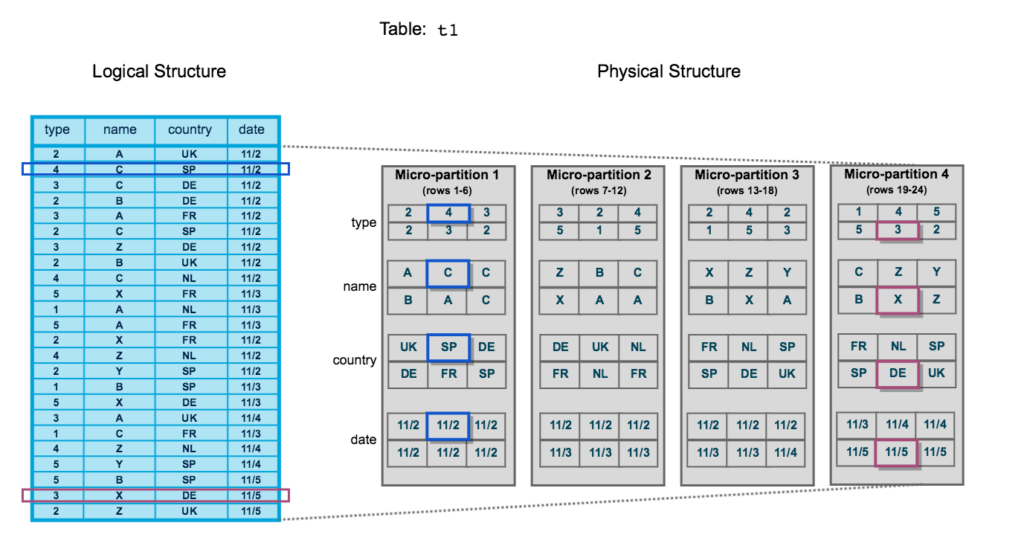
Immutability
Immutability means that each micro-partition by design is not changed once it is created. When a change occurs in data, a new micro-partition is created, and the old one persists in storage for the data retention time defined by the administrator. This is one of the pieces of the design of Snowflake that allows some of the key differentiating features of Snowflake, particularly Zero-Copy Cloning and Time Travel, both of which we’ll talk about in more detail later.
Metadata
Each micro-partition, in addition to the actual data that belongs in the table, also contains metadata. The metadata includes things like a row count and the maximum and minimum values in each column.
Features
Now that we’ve reviewed how Snowflake was built to store data, we can discuss the ways that those engineering decisions are actually leveraged to provide the features we know and love on the platform.
Zero-Copy Clone
Zero copy clone is very simple example of the practical implications of Snowflake’s design. Since data isn’t directly stored in tables from a structural standpoint, but instead is a series of logical metadata relationships between the logical table that users interact with and the physical data micro-partitions, cloning data doesn’t have to involve ANY movement of the physical data.
That is how Zero-Copy Cloning works. When a user creates a zero-copy clone of a table, the initial table remains unchanged, while a new metadata relationship is created to the existing micro-partitions. Nothing moves, but a new table is created pointing to the existing data. If no changes occur to either table, they also continue to share that physical data, and in addition to saving on the compute time to create the table, there is no additional storage. If only part of the storage changes, then unchanged micro-partitions also remain shared.
Time Travel
Time travel is quite similar to Zero-Copy Cloning in that it’s simply a result of all the engineering decisions about separating physical from logical data storage and the immutability of micro-partitions. Data is physically stored as micro-partitions and linked to the logical table definitions the user sets up. When data changes in the table, immutability means that a new micro-partition is created but the old micro-partition is still there. That old micro-partition still has a relationship to the logical table: , it’s just one that is related to a specific table during a specific time frame. The upshot of this is that until the data-retention time period when the old micro-partition is discarded, we can traverse that old metadata and see the data at a given point in the past as long as we still have that old micro-partition.
Pruning
One of the main ways that Snowflake can plan out and efficiently execute queries is via Pruning. Previously, I mentioned that micro-partitions have metadata including a min and max value for each column. With that information, Snowflake can save compute by ignoring micro-partitions that do not have any records with values that could possibly satisfy WHERE clause filters. While Snowflake does not have true, traditional indexing like traditional RDBMS systems, it does offer Clustering, which allows the micro-partitions in a table to be reorganized to take maximum advantage of pruning. Clustering must be performed explicitly, and the compute saved should be weighed against the compute cost of actually performing the cluster. On very large tables that are queried very frequently and almost always filtered by one or two fields it can be worth it.
Conclusion
With every technology we employ, there are hidden elements of design that impact the way that they perform. I’ve enjoyed laying out a few of the “in-the-weeds” details about Snowflake today, and how they empower the key features of the platform.
If you want to know more, more is available on the Snowflake documentation page. If you have any questions, feel free to reach out!

Leave a Reply